

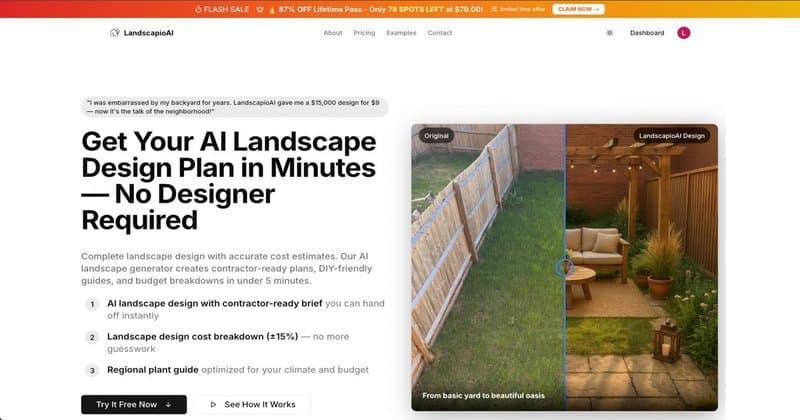
The AI landscape design space has changed fast. A year ago, your options were generic image generators that produced fantasy gardens with no practical use. Today, several tools generate actual design plans — with plant lists, cost estimates, and project briefs — from a single photo.
We tested every major free AI landscape design tool available in 2026. This guide covers what each one actually produces, where each falls short, and which is worth your time if you are planning a real project.
What We Tested
We evaluated each tool against five criteria:
- Visual quality — does the rendered design look realistic and useful?
- Plan output — does it produce anything beyond the image? (plant list, cost estimate, material list)
- Ease of use — can a non-designer get a useful result without a learning curve?
- Constraint handling — does it respect your existing structures and stated preferences?
- Free tier value — what can you actually do without paying?
The Tools
1. LandscapioAI — Best for complete planning output
Free tier: Full design + plant list + cost estimate + contractor brief (unlimited uploads, some features paywalled)
LandscapioAI is built specifically for homeowners planning real landscape projects, not for design professionals or concept artists. The key differentiator: it produces a complete planning package from a single photo, not just a visualization.
What it generates:
- Redesigned photo of your space
- Zone-by-zone breakdown (patio zone, garden beds, lawn area, etc.)
- Plant list with quantities, organized by zone
- Material list with estimated quantities
- Cost estimate (low/mid/high ranges by region)
- Contractor-ready project brief
Strengths:
- Only free tool that produces cost estimates and contractor briefs
- Plant suggestions are regionally calibrated (accounts for climate zone)
- Output is immediately actionable — you can hand the brief to a contractor
- No design experience required
Limitations:
- Visualization is good but not as photorealistic as some pure image generators
- Works best with clear, well-lit photos (struggles with dark or heavily shadowed images)
Best for: Homeowners who want to actually build something, not just visualize it. The planning output is what separates it.
2. Adobe Firefly (Generative Fill) — Best for pure visualization
Free tier: 25 generative credits/month on free plan
Adobe Firefly is not a landscape design tool — it is a general-purpose AI image generator that happens to work well for visualizing outdoor spaces when used with the right prompts. Its Generative Fill feature lets you select areas of a photo and replace them with AI-generated content.
What it generates:
- High-quality photorealistic images
- Nothing else — no plant lists, no costs, no briefs
Strengths:
- Visualization quality is excellent — arguably the best image output of any free tool
- Precise control: you select exactly which area to modify
- Works for small edits (replace just the lawn, just the planting beds) or full redesigns
Limitations:
- Free tier is 25 credits/month, which goes fast
- No planning output whatsoever — just images
- Requires Photoshop or the Firefly web app to use effectively
- Significant learning curve for non-designers
- No understanding of plants, climate, or construction — generates whatever looks good
Best for: Homeowners who already have a design plan and want to visualize alternatives. Not useful for someone who needs a plan.
3. Canva AI (Magic Studio) — Best for quick concept sketches
Free tier: Limited AI generation credits on free plan; Magic Studio features mostly on Pro
Canva's AI tools include background replacement and image generation that can be used for rough landscape visualization. It is not purpose-built for landscape design but is accessible to anyone who has used Canva.
What it generates:
- Rough visual concepts
- Nothing else
Strengths:
- Extremely low barrier to entry — if you use Canva, you already know how to access it
- Good for rough mood board / concept direction
- Fast
Limitations:
- Output quality is noticeably lower than dedicated tools
- No landscape-specific training — results are generic
- No plan output
- Free tier heavily restricted
Best for: Creating quick visual concepts to communicate your general direction to a designer. Not for actual planning.
4. RoomGPT (outdoor mode) — Decent for simple spaces
Free tier: Limited generations
RoomGPT was originally built for interior room redesigns but added outdoor space functionality. It works by taking a photo and applying a style transformation.
What it generates:
- Redesigned photo in selected style
- No plan output
Strengths:
- Simple single-step process
- Decent output for simple, well-defined spaces
- Free tier available
Limitations:
- Trained primarily on interiors — outdoor results are less consistent
- No plant, material, or cost output
- Handles complex or irregular spaces poorly
- Style selection is limited
Best for: Getting a quick visual for a simple patio or small garden space. The simplicity is its best feature.
5. Midjourney (via prompt engineering) — High quality, high effort
Free tier: No longer available (subscription required, from $10/month)
Midjourney produces stunning landscape images when prompted correctly. However, it requires a subscription, significant prompt engineering skill, and produces zero planning output. It is included here because it comes up often in searches for "AI landscape design."
What it generates:
- Very high quality photorealistic landscape concepts
- Nothing else
Strengths:
- Best-in-class image quality
- Highly controllable with detailed prompts
- Large community of landscape-specific prompts and workflows
Limitations:
- No free tier
- Zero planning output
- Requires learning prompt engineering to get usable results
- Images are fantasy concepts, not design plans based on your actual space
Best for: Professional designers needing high-quality concept images. Not useful for homeowner planning.
Want More Than Just a Pretty Picture?
LandscapioAI gives you the full planning package: design visualization + plant list + cost estimate + contractor brief — all from one photo. Free to start.
Try It Free →
Head-to-Head Comparison
| Tool | Visual Quality | Plan Output | Free Tier | Best For |
|---|---|---|---|---|
| LandscapioAI | Good | ✅ Full (plant list, costs, brief) | Generous | Planning a real project |
| Adobe Firefly | Excellent | ❌ None | 25 credits/mo | Visualization only |
| Canva AI | Fair | ❌ None | Very limited | Quick concepts |
| RoomGPT | Good | ❌ None | Limited | Simple spaces |
| Midjourney | Excellent | ❌ None | None | Pro concept work |
What the Free Tier Really Gets You
A lot of ranking posts lump together tools that do completely different jobs. The more useful comparison is not "which looks coolest" but "what can I actually do before I hit a paywall?"
| Tool category | What you usually get for free | Hidden constraint to watch |
|---|---|---|
| Photo-first AI yard tools | 1–5 concept generations, basic style options | Limited exports, slower queues, no detailed materials list |
| General image generators | Strong visuals | No quantities, plant guidance, or practical scope |
| 2D/3D planning software | Layout tools, object libraries, sometimes AI assist | Learning curve, upgrades for exports/rendering |
| Full planning tools | Visual + plant/material/cost output | Free tier may cap premium exports or versions |
That is why homeowners frequently feel disappointed after trying a "free" landscape design app: the first image is free, but the actual planning work still sits behind either a subscription or manual effort.
What Homeowners and Pros Are Saying in Forums
Forum sentiment is split in a useful way. One widely surfaced Reddit answer argued that AI landscape tools are only creating "visual appeal" and can miss real-world constraints like hardiness zones and microclimates. That criticism is fair for generic image generators.
But the same discussion cluster also shows why these tools keep growing: homeowners want a faster, cheaper first draft than a traditional design engagement. In the Brave-result Reddit snippets for this keyword, builders and hobbyists kept returning to the same two asks — better plant realism and better cost guidance. In other words, people do not just want a prettier yard image; they want a plan they can actually act on.
That is the lens we used for this ranking. A free tool is only really useful if it helps you choose direction, understand tradeoffs, and move toward a buildable scope.
The Real Question: What Do You Actually Need?
If you just want to see what your yard could look like — any of these tools will give you that. Adobe Firefly and Midjourney produce the most impressive images.
If you need to actually plan and execute a project, only one free tool gives you what you need: a plant list you can take to a nursery, a cost estimate you can use to budget, and a contractor brief you can hand to a landscaper.
The gap between "here is a pretty picture of a fantasy version of your yard" and "here is what to plant, what to order, and what it will cost" is where LandscapioAI sits.
DIY AI Planning vs. Hiring a Landscape Professional
| Path | Typical cost | Timeline | Best use case | Main risk |
|---|---|---|---|---|
| DIY with free AI tools | $0–$50 | Same day | Early concepting, budget direction, shortlisting materials | Missing site-specific constraints (drainage, grade, code) |
| Hybrid (AI plan + contractor consult) | $150–$800 | 1–2 weeks | Most homeowner projects under $25k | Depends on contractor quality and quote detail |
| Full professional landscape design | $1,500–$6,000+ | 2–6 weeks | Complex grading, drainage, permits, or premium installs | Higher upfront cost |
Use AI first for speed, then escalate to a pro when structural or permitting complexity appears. This sequence usually gives the best speed-to-confidence ratio for residential projects.
DIY vs. Pro: Which Tools Match Which Buyer?
| Buyer situation | Best tool type | Why |
|---|---|---|
| You just want inspiration from one photo | Photo-first AI app | Lowest friction, fastest first result |
| You need dimensions, layouts, and material placement | 2D/3D planner like Planner 5D | Better for actual space planning |
| You need a plant list, budget, and contractor brief | Planning-oriented AI workflow | More actionable than pure rendering tools |
| You are changing grading, drainage, structures, or permitting | Human designer / contractor | AI can assist, but should not be the final authority |
The practical rule is simple: use free AI to narrow the direction, then decide whether your project needs layout precision or professional validation before you buy materials.
How to Get the Most From Any AI Landscape Tool
Take a better photo. Every AI tool performs better with a clear, well-lit photo taken from standing height at the edge of your space. Overcast lighting is ideal (no harsh shadows). See our complete guide: how to get the best AI landscape design from a photo.
Be specific about constraints. Tell the tool what cannot change (existing trees, fence lines, slope) and what must change (the dead lawn, the overgrown beds). Generic input produces generic output.
Use the planning tools alongside the design tools. Once you have a design direction, use our free calculators to verify material quantities before ordering:
Get a cost estimate before you get contractor quotes. An AI-generated cost estimate is directional — but having a rough number before you talk to contractors puts you in a much stronger negotiating position. See our full landscaping cost guide for what to expect in your region.
FAQ
Which AI landscape design tool is best for beginners?
LandscapioAI for planning, RoomGPT for quick visualization. Both require no design experience and have minimal learning curves.
Is there a completely free AI landscape design tool?
Yes. LandscapioAI offers a free tier that includes the full design flow: visualization, plant list, cost estimate, and contractor brief. Adobe Firefly offers 25 free credits per month for visualization only.
Can AI landscape design tools work for commercial properties?
Most tools (including LandscapioAI) handle commercial spaces. Results vary — simple commercial courtyards and office entrances work well. Large or complex commercial sites benefit from professional design in addition to AI tools.
How accurate are AI landscape design cost estimates?
Typically within 15–25% of actual contractor quotes for mid-range projects in most US markets. They are most useful as a directional budget tool and for comparing quotes. Always get at least three contractor quotes for any project over $3,000. See our landscaping cost guide for regional benchmarks.
Do I need to pay for a good AI landscape design?
No. The free tiers on LandscapioAI give you a complete planning output. Paid tiers add higher-resolution exports, additional design variations, and priority support — but the core planning functionality is free.
Sources
- Adobe Firefly Plans & Pricing — current free-credit and paid-tier details.
- Canva Pricing — Magic Studio and plan limits.
- Midjourney Pricing — subscription-only model details.
- Planner 5D Landscape Design Software — 2D/3D outdoor planning reference.
- Neighborbrite — example of a free photo-first AI landscape design workflow.
- USDA Plant Hardiness Zone Map — climate context for plant recommendations in planning outputs.
The Bottom Line
For pure image quality: Adobe Firefly or Midjourney.
For planning a real project: LandscapioAI is the only free tool that produces more than a visualization. The plant list, cost estimate, and contractor brief are what make the output actually useful when you are trying to build something, not just imagine it.
Start with a free design — upload your photo at LandscapioAI